Playing Roblox is a blast, but when your phone starts feeling like a mini-furnace, it quickly saps the fun. Many gamers, especially those juggling life's demands, find their mobile devices overheating while immersed in their favorite virtual worlds. This comprehensive guide dives deep into why Roblox can make your phone hot, exploring common culprits from graphics demands to background processes and even your internet connection. We'll provide actionable, easy-to-implement solutions and practical tips to reduce device temperature, optimize your gaming experience, and extend your phone's lifespan. Discover the best settings, clever cooling tricks, and smart habits to keep your phone running cool, ensuring your Roblox sessions remain enjoyable, smooth, and free from performance hiccups. Get ready to game longer and smarter without the heat!
Why does my iPhone get so hot when playing Roblox?
iPhones get hot playing Roblox primarily due to the powerful A-series chips working hard on graphics and processing. Apple devices, while efficient, are compact and rely on passive cooling. High graphic settings, background app activity, and playing in warm environments push the processor, leading to noticeable heat, especially in newer, more demanding Roblox experiences. It's a sign of intense computational effort.
How can I optimize my Android for Roblox without it overheating?
To optimize your Android for Roblox and prevent overheating, first lower in-game graphic settings to a manageable level. Secondly, ensure all non-essential background apps are closed. Third, keep your Android's operating system updated for performance improvements. Fourth, use a stable Wi-Fi connection. Finally, consider a 'Game Mode' if your phone has one, which prioritizes resources for gaming and can include thermal management features. Regularly clearing app cache can also help maintain efficiency.
What are the immediate steps to cool down my phone after playing Roblox?
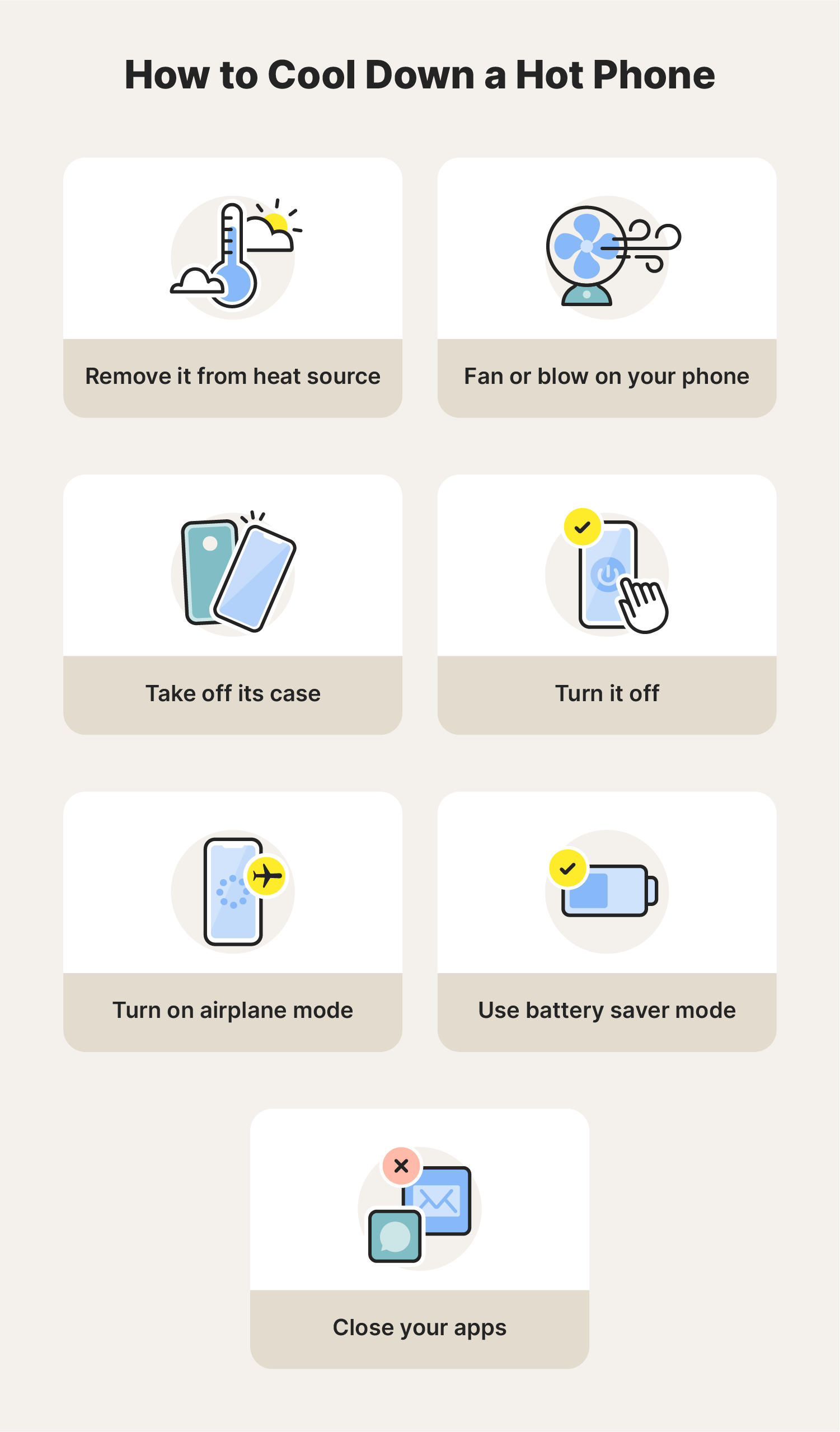
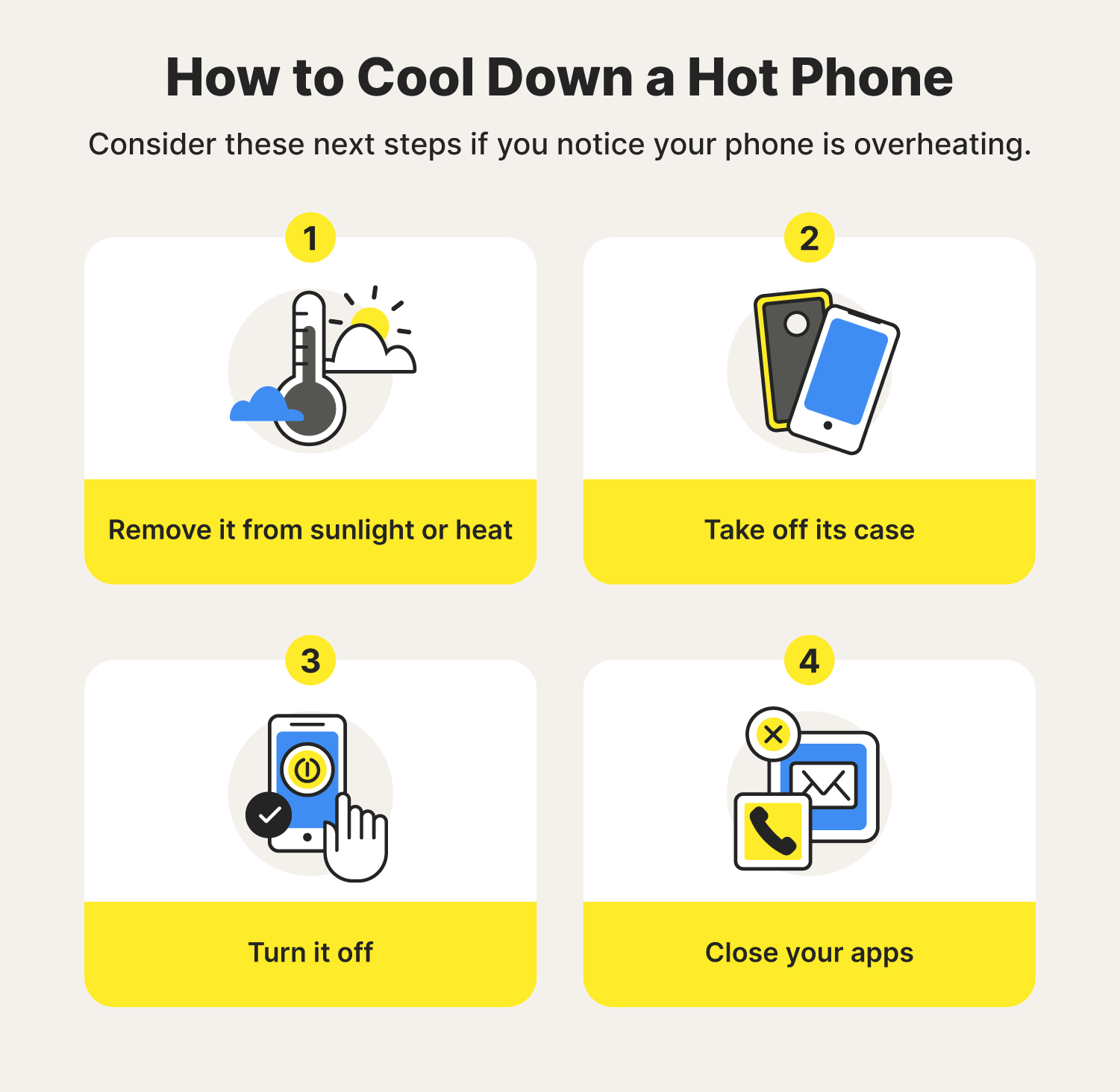
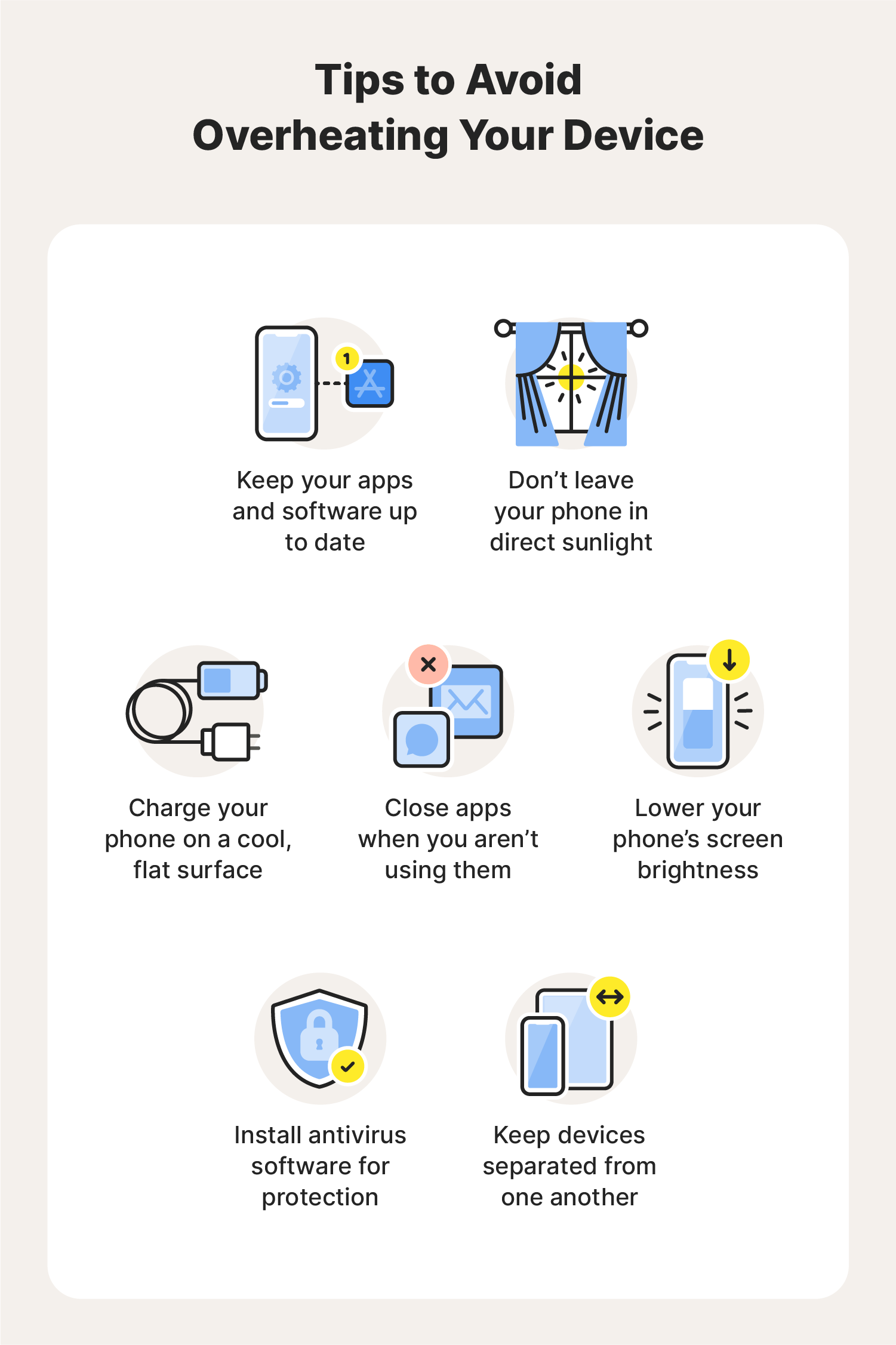
If your phone is hot after playing Roblox, immediately close the Roblox app and any other running applications. Next, remove your phone case to allow for better heat dissipation. Place your phone on a cool, flat surface, or near a fan, avoiding direct sunlight. Do not put it in a refrigerator or freezer, as extreme temperature changes can cause condensation and damage. Give it a few minutes to cool down naturally before resuming use or charging.
Does Roblox's graphic quality setting impact phone temperature significantly?
Yes, Roblox's graphic quality settings have a significant impact on phone temperature. Higher graphic fidelity, such as increased texture detail, shadow quality, and rendering distance, demands more processing power from your phone's GPU. This intensified workload directly translates to greater energy consumption and heat generation. Lowering these settings, even by a notch or two, can dramatically reduce the strain on your device and keep temperatures much cooler during gameplay.
Is there a specific time limit I should play Roblox to avoid overheating?
There isn't a universal time limit, as overheating depends on your specific phone, settings, and environment. However, a good rule of thumb is to take a break if your phone becomes uncomfortably warm to touch, or if you notice any performance drops like lag or stuttering. For many, 30-60 minutes of continuous intensive play might be a reasonable duration before a short cool-down period is beneficial. Listen to your device and your comfort level.
Can outdated Roblox app versions cause my phone to heat up more?
Potentially, yes. Outdated Roblox app versions might contain less optimized code or bugs that lead to inefficient resource utilization. Developers frequently release updates that include performance enhancements, bug fixes, and better thermal management. Running the latest version ensures you're benefiting from these optimizations, which can help reduce the strain on your phone's hardware and mitigate overheating issues. Always keep your Roblox app updated.
What accessories can help prevent my phone from getting hot with Roblox?
Several accessories can help prevent your phone from overheating during Roblox sessions. The most common are clip-on phone coolers or gaming grips with integrated fans, which actively draw heat away from the device. Additionally, breathable phone cases (or playing without a case) improve natural airflow. Some pro-level mobile gamers even use small, portable USB-powered fans pointed at their device. These external solutions are great for maintaining optimal temperatures during extended playtimes.
Ah, the joy of diving into Roblox's endless universes! One minute you're building epic structures or battling friends, the next, your phone feels like it's ready to cook an egg. This burning sensation isn't just uncomfortable; it's a common and frustrating problem for many mobile gamers, especially the 87% of US gamers who regularly enjoy their favorite titles on the go. For busy adults balancing work, family, and a craving for digital relaxation, a hot phone means interrupted fun, potential performance drops, and concerns about device longevity. You're not alone in wondering, "why does Roblox make my phone hot?" This article is your ultimate guide to understanding the root causes and, more importantly, finding practical, real-world solutions to keep your device cool and your gaming sessions smooth. Let's tackle this fiery issue together so you can focus on what matters most: having fun and connecting with friends.
Mobile gaming has soared, with recent data showing it dominates the gaming landscape, and titles like Roblox, known for their user-generated content and social aspects, are at the forefront. But with great immersion comes great processing demand, and often, heat. Your phone is a compact powerhouse, and when pushed, it generates heat. Understanding the 'why' behind your phone's rising temperature is the first step towards a cooler, more enjoyable gaming experience. We'll break down the technicalities into easily digestible advice, ensuring you can apply these tips regardless of your tech savviness. Say goodbye to uncomfortable, laggy gameplay and hello to optimized performance.
Why Does Roblox Make My Phone Hot?
Roblox, despite its blocky aesthetic, can be surprisingly resource-intensive. The primary reason your phone gets hot while playing is the sustained workload placed on its internal components, specifically the Central Processing Unit (CPU) and Graphics Processing Unit (GPU). When you're exploring vast worlds, loading intricate models, or participating in crowded servers, your phone's hardware is working overtime. This intense processing consumes significant power, which in turn generates heat. Think of it like a mini-computer in your pocket; the harder it works, the warmer it gets. This is a normal physical phenomenon, but it can be exacerbated by various factors, leading to uncomfortable temperatures and potential performance issues.
What Causes Mobile Devices to Overheat When Playing Games?
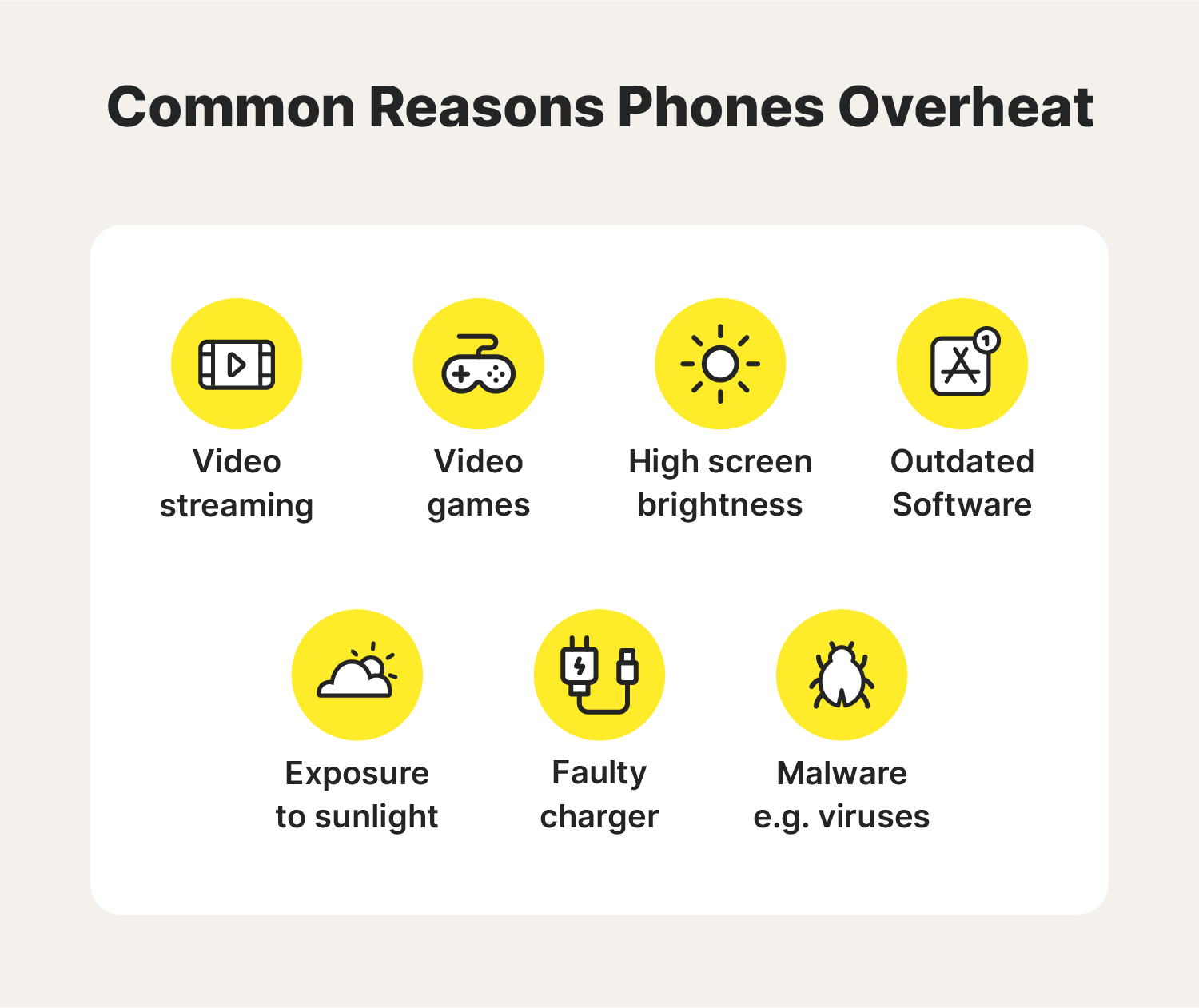
Beyond Roblox's inherent demands, several factors contribute to mobile device overheating during gaming. First, **graphic settings**: Higher resolution, richer textures, and more detailed shadows require more processing power. Second, **background applications**: Even if not actively used, apps running in the background consume RAM and CPU cycles, adding to the load. Third, **poor ventilation**: Unlike PCs with dedicated fans, phones rely on passive cooling. Playing with a thick case or in a confined space traps heat. Fourth, **internet connection quality**: A weak Wi-Fi or mobile data signal forces your phone's modem to work harder to maintain a connection, generating additional heat. Fifth, **device age and health**: Older phones or those with degraded batteries are less efficient at managing power and heat. Finally, **charging while playing**: This puts a dual load on the battery and internal components, significantly increasing heat generation.
Is It Bad If My Phone Gets Hot While Playing Roblox?
Moderate warmth is normal, but excessive heat is definitely a concern. Prolonged exposure to high temperatures can have several detrimental effects on your phone. Most critically, it can accelerate the degradation of your phone's **battery health**. Heat is the enemy of lithium-ion batteries, reducing their overall lifespan and capacity over time. Beyond the battery, extreme heat can also impact the performance and longevity of other internal components, potentially leading to throttling (where the phone deliberately slows down to cool itself), crashes, or even permanent damage to the CPU or GPU. While occasional warmth might be tolerable, consistent overheating requires attention to protect your valuable device and ensure a consistent gaming experience.
How Can I Reduce My Phone's Temperature While Playing Roblox?
There are several effective strategies to bring your phone's temperature down. Start by **optimizing in-game settings** within Roblox, reducing graphics quality if possible. Next, ensure you **close all unnecessary background apps** before launching Roblox. Freeing up RAM and CPU cycles can make a significant difference. Playing in a **well-ventilated area** and removing your phone case can also help dissipate heat more efficiently. Consider taking short breaks during long gaming sessions to allow your device to cool down naturally. If you're a heavy gamer, investing in a simple **external cooling fan** designed for mobile devices can be a game-changer. Finally, avoid charging your phone while playing, as this significantly increases heat.
What Are the Best Roblox Settings for Mobile Performance and Less Heat?
Adjusting your Roblox in-game settings is one of the most impactful ways to reduce heat. Navigate to the Roblox settings menu (usually accessible via the three dots icon in-game). Look for graphics quality options. **Lowering the graphics quality** or setting it to 'Automatic' (if available) allows Roblox to run with less strain on your phone's GPU. Specifically, reducing the 'Graphics Mode' or 'Graphics Quality' slider will immediately lessen the processing load. While the visual fidelity might drop slightly, the trade-off is often smoother gameplay and a significantly cooler phone, enhancing your overall experience and preventing annoying stutters. Experiment to find the sweet spot that balances visuals with performance for your specific device.
Should I Close Background Apps Before Playing Roblox?
Absolutely, yes! This is a simple yet highly effective trick that many gamers overlook. Even if you're not actively using them, apps running in the background can silently consume your phone's precious resources – RAM, CPU cycles, and even network bandwidth. Each background process adds to the overall workload your phone has to manage, generating extra heat that Roblox then compounds. Before launching Roblox, take a moment to **force-close all non-essential applications**. On Android, you can typically do this from the recent apps menu or in settings under 'Apps'. On iOS, swipe up from the bottom (or double-tap home button) and swipe apps away. This frees up resources, allowing your phone to dedicate more power to running Roblox efficiently, resulting in less heat and better performance.
Does My Phone's Age or Model Affect Overheating in Roblox?
Yes, significantly. Newer phone models often come equipped with more powerful processors, better optimized operating systems, and improved thermal management systems compared to older devices. An older phone, particularly one several generations behind, will struggle more to run graphics-intensive games like Roblox. Its older CPU/GPU will work harder to achieve comparable performance, leading to greater heat generation. Additionally, older batteries are less efficient and can contribute to overheating. If you're using a device that's 3+ years old, you might notice it heating up faster and more intensely than a newer model, even with optimized settings. Upgrading hardware, while a financial commitment, is often the ultimate solution for persistent overheating issues in aged devices.
How Does Internet Connection Impact Phone Heat During Roblox?
Your internet connection plays a subtle but crucial role in phone temperature. If you're on a **weak or unstable Wi-Fi signal**, or relying on a patchy mobile data connection, your phone's internal modem has to exert more effort to maintain a consistent connection to Roblox servers. This increased effort translates into higher power consumption and, consequently, more heat. Imagine your phone constantly searching or struggling to transmit and receive data – it's like a constant low-level workout. To minimize this, always try to play Roblox on a **strong, stable Wi-Fi connection**. If you must use mobile data, ensure you have good signal strength. This not only reduces heat but also improves latency and overall gameplay smoothness, which is vital for social, real-time games like Roblox.
Are There External Cooling Solutions for Mobile Gaming?
For dedicated mobile gamers, external cooling solutions can be a godsend. These accessories are designed specifically to help dissipate heat from your phone's surface. Common options include **clip-on phone coolers** or **gaming grips with integrated fans**. These devices typically attach to the back of your phone and use small fans to draw heat away, providing a direct cooling effect. While they might add a bit of bulk, the benefit of sustained, high-performance gameplay without throttling or discomfort is often worth it. Some high-end gaming phones even come with advanced internal cooling systems or compatible external accessories. Before buying, check reviews and compatibility with your specific phone model to ensure optimal performance and value for money.
When Should I Worry About My Phone Overheating?
While some warmth is normal, it's time to worry if your phone becomes **uncomfortably hot to touch**, shows **performance throttling** (lag, stuttering), **apps crash frequently**, or you receive **system warnings** about high temperatures. These are clear signs that your device is struggling to cope and is at risk of long-term damage. Pay attention to how quickly it heats up and how long it stays hot. If it reaches critical temperatures within minutes of starting a game, or stays hot for an extended period even after closing apps, it warrants immediate action. Regularly monitoring your phone's temperature (some apps can help with this) can give you peace of mind and help you intervene before problems escalate. Your phone's health affects your gaming fun!
What Are the Long-Term Effects of My Phone Getting Hot from Gaming?
Consistent overheating from intensive gaming like Roblox can have several long-term, negative consequences for your device. The most significant impact is on your **battery's lifespan and capacity**. Heat causes lithium-ion batteries to degrade faster, leading to reduced battery life per charge and a shorter overall service life before needing replacement. Beyond the battery, chronic overheating can stress internal components like the CPU and GPU, potentially shortening their functional lifespan. It can also cause subtle damage to solder joints and other delicate circuitry, leading to stability issues, random restarts, or even hardware failure over time. Proactively managing heat isn't just about immediate comfort; it's an investment in your phone's longevity and reliable performance for all your future gaming adventures.
Tips for Balancing Roblox Gaming with Phone Health
Finding the sweet spot between enjoying Roblox and maintaining your phone's health is crucial for any gamer. Here are some actionable tips: schedule specific gaming times to avoid prolonged sessions, ensure your phone is adequately charged before starting (but don't charge while playing), keep your phone's software updated, and regularly clean out unused apps and cached data. Consider playing Roblox in shorter bursts, allowing your device to rest and cool down between rounds or experiences. Mobile gaming has become a cornerstone of relaxation and social connection for many, with social gaming trends continuing to grow this month. By being mindful of your device's limits and applying these optimization strategies, you can continue to enjoy Roblox without sacrificing your phone's performance or lifespan. It's about smart, sustainable gaming for the long haul.
So, the next time you feel your phone warming up during a Roblox adventure, you'll know exactly why and what to do. By implementing these strategies, you're not just cooling your phone; you're preserving its performance, extending its life, and ensuring countless more hours of uninterrupted fun. Remember, smart gaming is cool gaming. What's your biggest gaming challenge when it comes to performance or device health? Comment below!
FAQ Section
Can a hot phone damage its battery permanently?
Yes, prolonged exposure to high temperatures can permanently reduce your phone's battery capacity and overall lifespan, leading to it holding less charge over time.
Is it better to play Roblox on Wi-Fi or mobile data for less heat?
Generally, playing on a strong, stable Wi-Fi connection is better. Weak mobile data signals can make your phone's modem work harder, generating more heat.
Should I remove my phone case when playing Roblox?
Yes, especially if it's a thick case. Removing it allows for better airflow and helps dissipate heat more effectively from your phone's surface.
Does charging my phone while playing Roblox make it hotter?
Absolutely. Charging generates heat, and simultaneously running a demanding game like Roblox significantly increases the thermal load, making your phone much hotter.
What's the ideal room temperature for mobile gaming?
Playing in a cooler environment, ideally between 68-75°F (20-24°C), helps your phone's passive cooling mechanisms work more efficiently and reduces the likelihood of overheating.
Do software updates for Roblox help with overheating?
Often, yes. Developers frequently release updates that include performance optimizations and bug fixes, which can sometimes improve resource management and reduce heat generation.
Can a full storage on my phone contribute to overheating?
While not a primary cause, a critically full storage can sometimes lead to the operating system working harder to manage files and cache, indirectly contributing to minor heat generation. Keeping some free space is generally good practice.
Roblox heats phones due to high graphic demands, intensive CPU usage, and background apps. Device age, poor ventilation, and weak internet also contribute. Key solutions include optimizing in-game settings, closing unnecessary apps, ensuring good airflow, and using external cooling. Overheating can damage battery life and impact performance, making management crucial for extending phone longevity and maintaining smooth gameplay.
35



How Can You Stop Roblox From Overheating TechCult Why Does Roblox Make Your Phone Hot 1024x683 . Why Is My Phone Overheating 7 Ways To Recognise And Avoid It Why Does My Phone Get Hot 01 . Jak Zmniejszy Lagi W Roblox Na Telefonie Pl DALL.E 2025 03 23 08.37.55 A Realistic Image Showing A Person Holding A Smartphone With Roblox Open On The Screen. The Person Is Adjusting Game Settings To Reduce Lag With A G.webp. How To Fix Roblox Thinking You Re On Mobile While Using PC 2026 Fix . Here S What Investors Will Be Watching With Roblox In 2026 The Motley Image




2026 UPDATED How To Fix Roblox Thinking You Re On Mobile Chromebook . Why Is My Phone Overheating 7 Ways To Recognise And Avoid It Why Does My Phone Get Hot 03 . How To Fix Roblox Thinking Your On Mobile Why Does Roblox Think Im On . How To Update Roblox In 2026 Fix Error Code 280 On PC Mobile Xbox Roblox Update It.webp. Parents Find Dangerous Loopholes As Roblox Changes Chat Policies JA Roblox Warning COMP 34c510


What Does It Mean When Phone Is Hot At Jerome Henderson Blog How To Cool Down A Hot Phone . How To Make A Roblox Game On Mobile IPad Phone 2026 Obby Obby Blog. Roblox Keeps Crashing Why Does My Roblox Keep Crashing Mobile TikTok Sddefault . Roblox Keeps Crashing Why Does My Roblox Keep Crashing Mobile TikTok . How To Message On Roblox 2026 A Quick Guide




Can You Develop Roblox Games On Your Phone In 2026 Roblox 5 . Why Does Roblox Keep Crashing Guide Why Does Roblox Keep Crashing Step 33 . Why Does My Roblox Keep Closing How To Fix Guide YouTube . Why Is Roblox Not Working June 2026 24 Fixes That Actually Work Why Is Roblox Not Working 2025 24 Fixes That Actually Work . What Is Broack Roblox And Why Is It Trending In 2026


Why Does Roblox Keep Crashing Guide V4 460px Why Does Roblox Keep Crashing Step 6 . Why Won T My Roblox Voice Chat Work Simple Fixes . How To Message On Roblox 2026 A Quick Guide . Why Won T My Roblox Voice Chat Work Simple Fixes . How To Add Phone Number In Roblox YouTube



Roblox Keeps Kicking You Out Heres Why Roblox Kick Out Idle 20 Minutes . It S Time To Say Goodbye To Phone Numbers Website Features . Why Won T My Roblox Voice Chat Work Simple Fixes . Why Won T My Roblox Voice Chat Work Simple Fixes . How To Make Your Roblox Profile Pose On PC Playbite How Much Robux Does Roblox Have Playbite



Why Is My Phone Overheating 7 Ways To Recognise And Avoid It Why Does My Phone Get Hot 02 . How To Roblox Voice Chat Not Working Roblox Voice Chat Not Working Step 14 Version 2 . Why Is My Roblox Freezing Quick Fixes Explained 2026 . Fixed ROBLOX Error This Experience Is Currently Not Available Install 1 . Why Does Roblox Keep Crashing Guide V4 460px Why Does Roblox Keep Crashing Step 30